photography / macos / open source
openstill.
a little space for your photographs.
a free, open-source photo viewer and editor for macos. browse your photographs, make nondestructive edits, and keep your originals intact.
a look inside
captured in the mac appthe actual openstill workspace, with a sample photograph. select any screenshot to see it at full size.
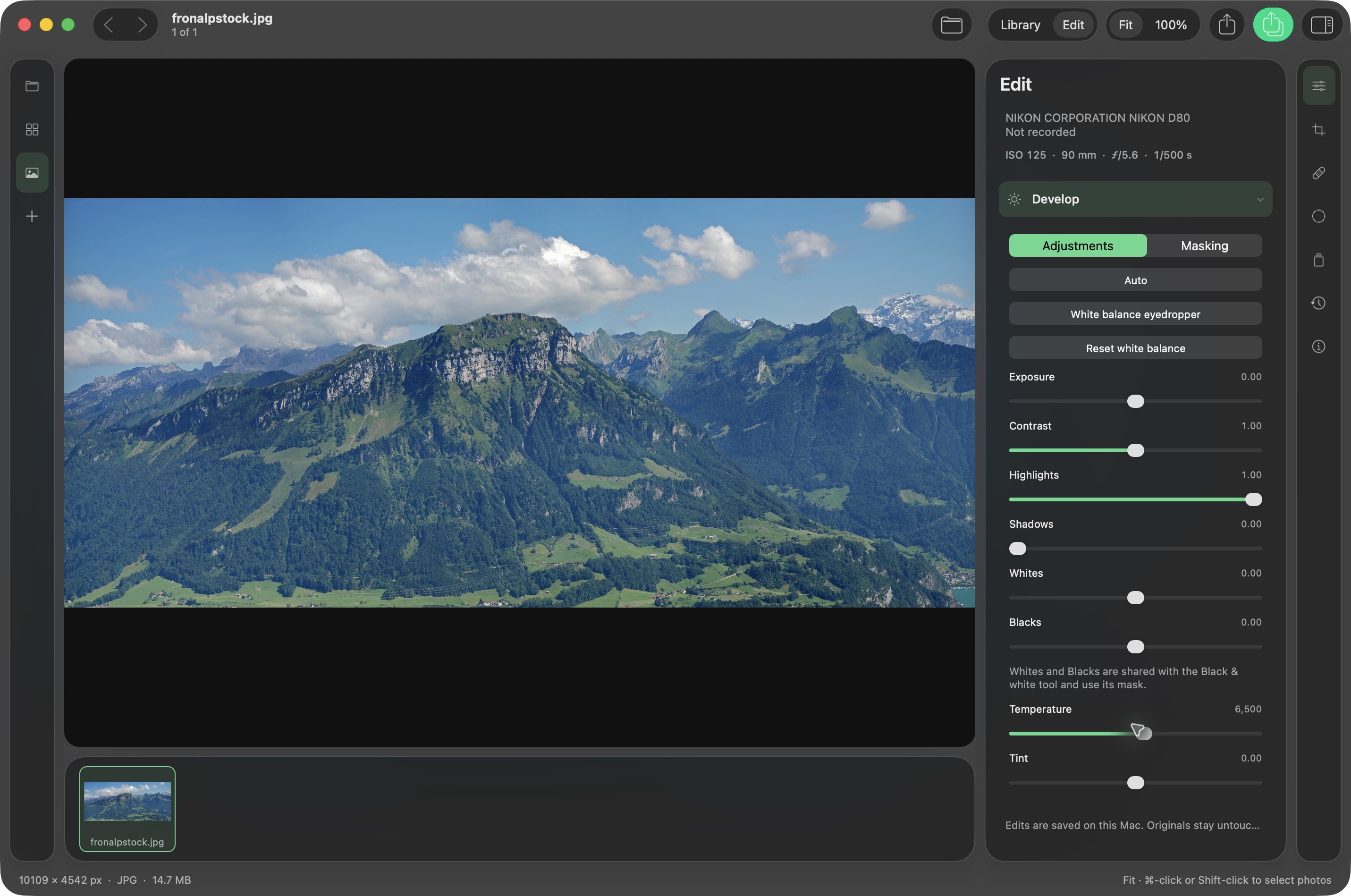
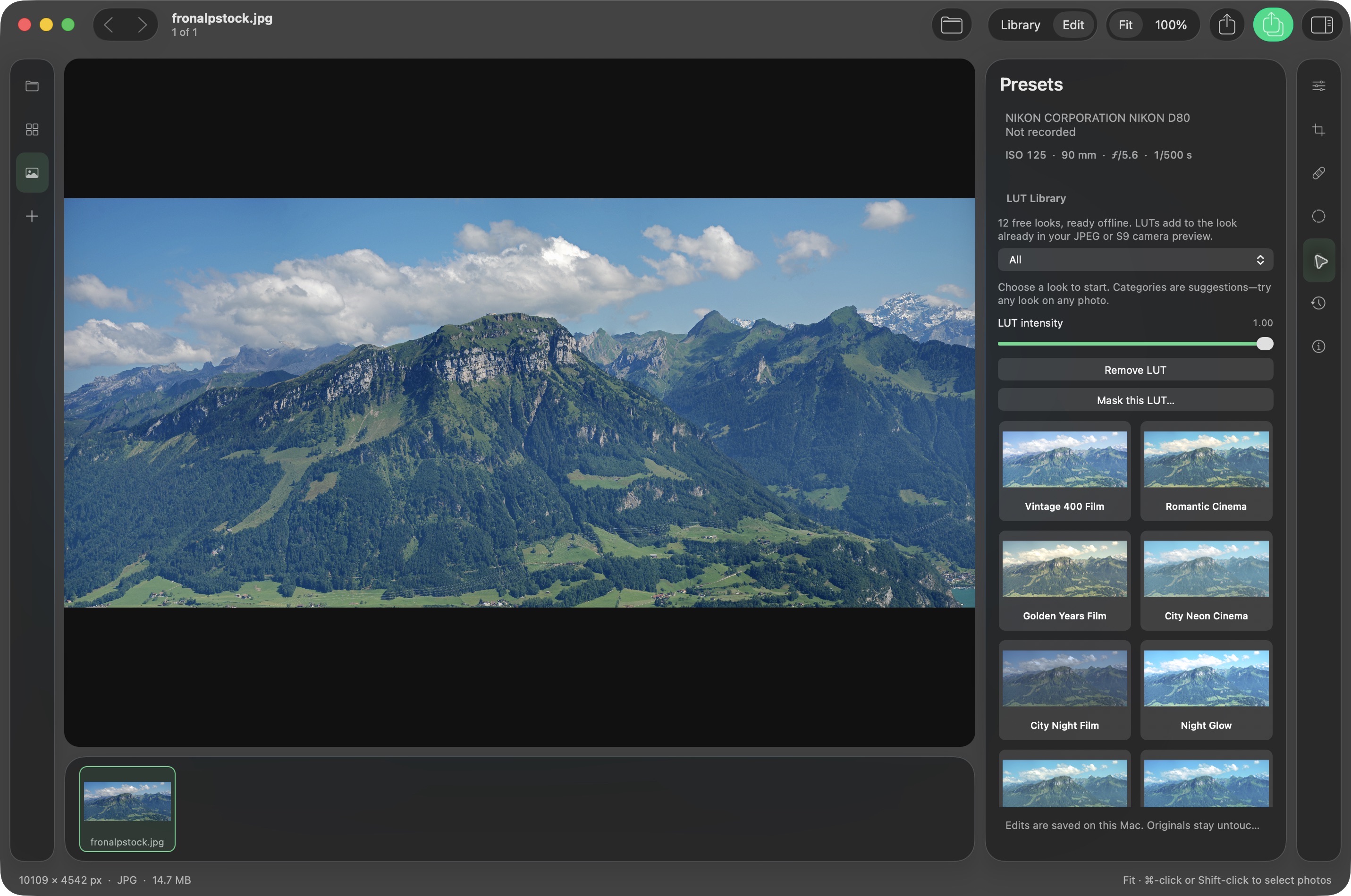
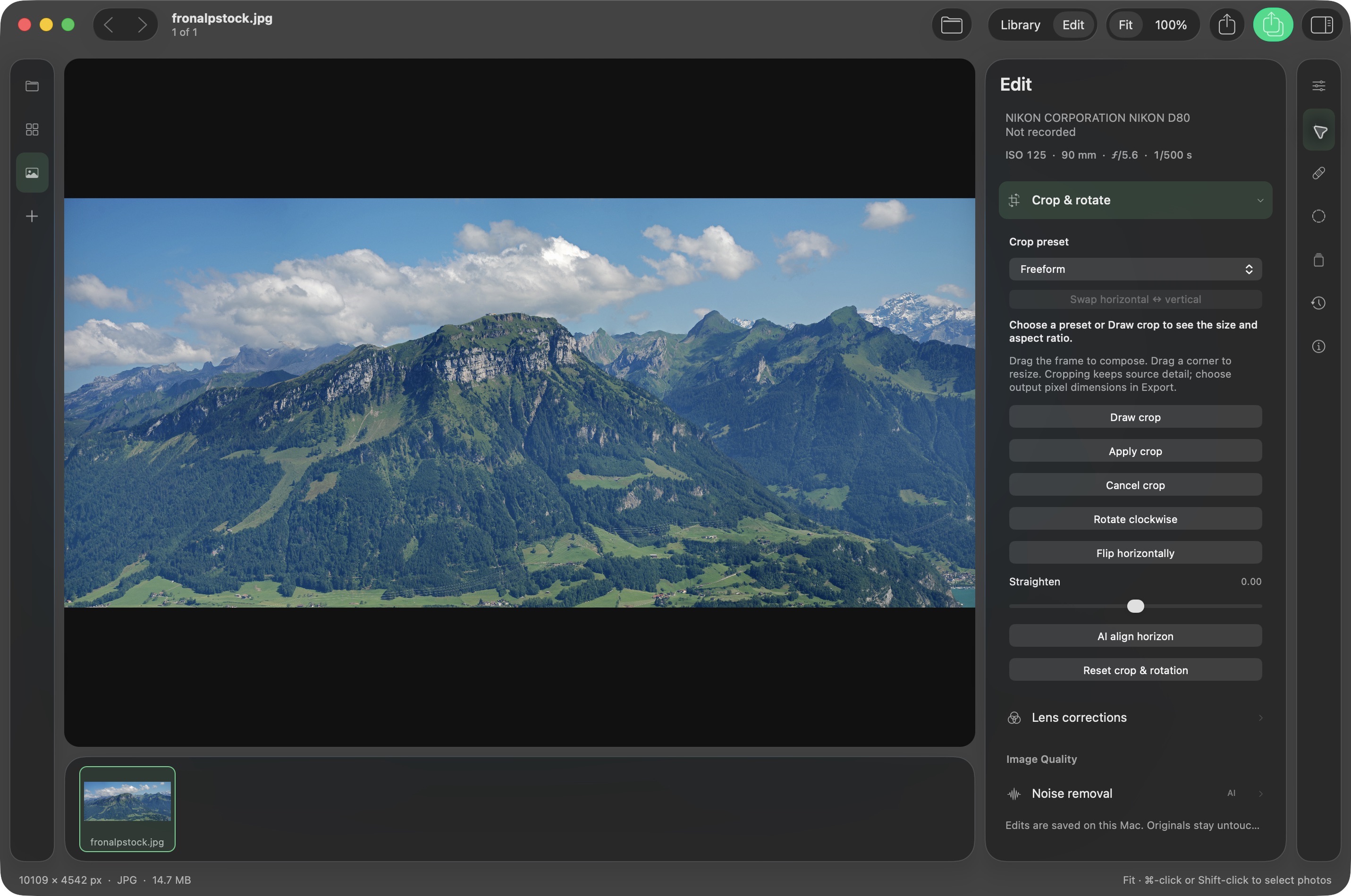
screenshots show the installed mac app; newer features may appear differently. demo photograph: fronalpstock by hannes röst, cc by-sa 3.0. resized within the app; preset previews apply color treatments. these screenshot adaptations are shared under the same license.

the full toolkit
from first import to final deliveryexplore every feature area documented in the github readme. open a section for the details.
based on the project readme checked september 27, 2026. development features may be ahead of the downloadable build; check its release notes for availability.
01browse & view
- photos, folders, and filmstrip. open a photo, a folder, or a dropped selection. neighboring photos sort naturally by filename, and the horizontal filmstrip supports individual, range, and select-all selection. browse with arrow keys, space/shift-space, or option-scroll.
- see the detail. fit to window, true 100% retina pixels, pointer-anchored pinch and wheel zoom from 1% to 1600%, drag-to-pan, and full-screen viewing. jpeg, png, heic, tiff, and other macos imageio formats are supported; animated and multipage files show their first frame.
- safe file handling. reveal photographs in finder or move one selected original to macos trash after confirmation. paired files and sidecars remain untouched; unsupported trash operations never fall back to permanent deletion.
02library, catalog & organization
- local catalog. a sqlite library indexes file details, capture dates, camera and lens information, gps, ratings, flags, labels, titles, captions, and keywords. unchanged files open from the index, moved files can be recognized by their contents, and cached previews avoid repeated rendering.
- organize and find. 0–5 stars, pick/reject flags, five color labels, filters, sorting, recent folders, and optional subfolder scanning. search matches every word across filenames, titles, captions, keywords, cameras, and lenses. hierarchical keywords remain searchable at each level.
- collections and metadata. regular collections span folders; smart collections update from up to six all/any rules including rating, flag, label, keyword, camera, lens, iso, date, filename, edited state, and text. batch metadata editing and reusable presets cover creator, copyright, captions, location, and keywords without rewriting originals.
03verified import & duplicate review
- camera cards and folders. discover removable cards, scan subfolders, choose photos, and detect already-imported files using content hashes. date, time, camera, filename, and index templates organize folders and names without overwriting existing files.
- import with confidence. optionally make a second backup copy, apply metadata/develop presets and keywords, bring along xmp sidecars, and eject after a successful import. each copy is read back and hash-verified; source cards are never changed.
- find duplicates. compare exact copies by content or similar photographs using local apple vision feature prints. review suggested keepers based on rating, pick status, and file size; mark extras as rejects without deleting them.
04raw, camera looks & recorded metadata
- raw development. libraw sensor decoding, highlight recovery, camera white balance, and separate camera look/raw versions. choose ahd, aahd, dcb, dht, vng, ppg, or bilinear demosaicing, wavelet noise reduction, color-noise median passes, and hot-pixel reduction.
- lumix camera look. panasonic rw2 camera look uses the largest embedded jpeg to preserve the camera’s recorded appearance, including a real time lut. switch to raw for separate sensor development. preview resolution depends on the file; .vlt import and automatic lut-name detection are not supported.
- photo information. camera, lens, shutter, aperture, iso, focal length, exposure compensation, capture time, dimensions, format, and size. expand all recorded metadata for nested imageio exif/tiff/gps fields; absent information is labeled not recorded. proprietary maker notes and lens-id databases are not decoded.
05lightroom & xmp interoperability
- metadata sidecars. read and write ratings, labels, flags, hierarchical keywords, captions, copyright, and locations. optional automatic xmp writing preserves fields openstill does not manage, including existing camera raw develop settings.
- bring edits across. import camera raw xmp adjustments as a separate version, including tonal/color controls, grading, curves, grain, sharpening, noise reduction, defringe, manual transform, crop, and monochrome. unsupported settings are reported, and openstill’s rendering is not pixel-identical to adobe’s.
- lightroom classic catalogs. read .lrcat catalogs without changing them; import metadata, develop versions, and regular collections, and relink moved folders. smart collections, virtual copies, and custom label names are not imported. repeated imports avoid duplicate lightroom versions.
06tone, color & detail
- profiles and calibration. standard, neutral, vivid, portrait, landscape, and monochrome starting profiles; adjustable profile strength; imported dng camera profiles; red, green, and blue primary calibration and shadow tint. dcp hue/saturation maps, look tables, and tone curves are supported; raw camera matrices come from libraw.
- develop and exposure. exposure, contrast, highlights, shadows, whites, blacks, temperature, tint, automatic tone adjustment, neutral white-balance eyedropper, and master/rgb tone curves. histogram and clipping overlays distinguish rendered clipping from raw sensor saturation.
- fine control. enhance, structure, clarity, texture, dehaze, sharpening, and noise reduction. global saturation/vibrance, eight-band hsl, shadows/midtones/highlights/global color-grading wheels, blending and balance, monochrome controls, vignette, and film grain.
- compare as you work. toggle the original or use a before/after split with a draggable divider. undo, redo, revisit history, or reset. these are openstill’s own algorithms; familiar controls do not imply identical results to another editor.
07geometry, lens corrections & retouching
- crop and straighten. freeform, original, square, horizontal/vertical photo ratios, and common output resolutions. swap orientation, inspect crop dimensions, rotate, flip, straighten manually, level from lines, or align a horizon with local apple vision.
- perspective and lenses. upright level, vertical, full, auto, and guided modes; manual vertical/horizontal perspective, rotation, aspect, scale, and offsets; constrain crop to fill edges. lensfun profiles, reliable automatic raw matches, manual tuning, and purple/green defringe controls.
- heal, clone, and layers. nondestructive heal/clone strokes with source selection, brush size, feathering, opacity, and aligned cloning. add one image overlay with opacity and normal, screen, or multiply blending; adjust overall edit strength.
08creative effects, depth & hdr editing
- glow and sunrays. glow, soft focus, orton effect, and orton effect soft with softness, brightness, contrast, and warmth. sunrays offer a movable sun center, length, penetration, radius, glow, ray count, randomization, and separate sun/ray warmth controls.
- depth-driven lens blur. use portrait-photo depth, an optional local depth estimate, or vision subject selection. adjust blur amount, focus distance/range, and near blur. this is variable blur, without optical bokeh highlight shapes.
- hdr preview. expand highlight headroom from 0.5–4 stops. compatible hdr displays on macos 14+ show extended range; sdr displays and outputs use the sdr rendition. creative tools retain independent masks and reversible settings.
09per-tool masks & ai selections
- build a mask. brush paint/erase with size, softness, and strength; linear and radial gradients; color and luminance ranges; feather, invert, and overlay visibility. named components support opacity, rename, duplication, copying, and add/subtract/intersect operations.
- select locally. apple vision selections cover objects, subject/background, people, individual people, face, eyes, eyebrows, lips, and skin. sky selection uses the optional u2-net model; depth-range masks use recorded depth or the optional local depth model. some selections require macos 14+.
- keep refining. combine ai selections with brushes and gradients. masks stay with their own tool, persist with history, and follow source geometry through crop, rotation, lens corrections, and transforms. overlays are never exported.
10presets & the free lut library
- reusable starting points. six adjustment presets: natural, warm light, cool shadows, vivid, soft portrait, and monochrome. save/load .openstillpreset files. portable presets keep tonal/color settings while preserving the destination photo’s masks, geometry, and image assets.
- 12 included cc0 looks. portraits: vintage 400 film, romantic cinema, golden years film. cityscape/street: city neon cinema, city night film, night glow. automotive: cool cinema, teal punch, noir era. nature/landscape: emerald film, woodland drama, tropical teal.
- preview and customize. photo-based previews, category browsing, adjustable intensity, independent lut masks, undo, and compatible imported 3d .cube files. included looks work offline; these are creative looks, not log conversions or replacements for sensor development.
11local ai tools
- erase and replace. lama removes selected objects; u2-net finds the sky boundary for your replacement sky photograph. refine the mask before processing. sky replacement does not automatically relight the foreground or replace reflections.
- denoise and restore. scunet noise removal, real-esrgan detail restoration, and 2× super resolution. raw-data denoising keeps sliders, crop, and masks adjustable; decoding changes require running it again. super resolution creates another version.
- depth and processing. depth anything v2 small supports depth masks and lens blur. processing runs locally with cancellation and reversible history steps; full-resolution cpu jobs may take minutes. earlier adjustments become part of a finished ai step; undo restores their editable state.
- setup. optional tools download about 450 mb of verified models plus python packages, with no account or api key. the documented ai setup uses python 3.11/3.12 and macos 14+ on apple silicon. other ai platforms are not validated. these are open-source models, not apple photos clean up or proprietary editing engines.
12versions, batch work & portable edits
- versions and history. named alternatives, separate camera look/raw development, renderer upgrades, automatic local saves, and ten rotating recovery snapshots. stable file references and content fingerprints reconnect moved originals; older versions keep their rendering.
- compare and batch. synchronized two-photo comparison with separate metadata. copy adjustments and review affected photographs and groups before pasting. geometry, masks, retouching, lenses, and ai assets are excluded by default; compatible geometry/masks require opt-in. undo batch protects later edits.
- portable projects. export/import .openstilledits packages containing versions, ratings, masks, referenced assets, and optional originals with checksums. relink packages without originals; imports add versions instead of silently replacing existing work.
13hdr merges, panoramas & focus stacks
- merge exposures. align bracketed frames, blend in linear light, and use deghosting for moving objects. hdr results retain bright highlight information.
- stitch and stack. cylindrical or perspective panoramas, crop-to-fill, and focus stacking from the sharpest image regions. results are separate floating-point tiff files added to the library; original photographs stay unchanged.
- check the result. alignment refines shift, rotation, and scale rather than perspective differences. panoramas use feathered seams, without spherical projection or boundary warp; focus stacks can show edge halos.
14people, maps, timeline & tethering
- people. local face detection and adjustable grouping, names, suggestions, and confirmed matches. people become hierarchical keywords usable in search, xmp, and exports. grouping uses general vision feature prints, so review suggestions.
- map and timeline. view and move photo locations, geotag from gpx tracks with camera time-zone/clock adjustment, filter to the visible map, or browse by capture year, month, and day. apple maps downloads map tiles; exports include gps only when selected.
- tethered capture. copy new usb-camera shots into a named session, apply metadata/develop presets, and open them in the editor. remotely trigger cameras that support ptp capture or use the camera shutter. no live view; hardware compatibility varies.
15export, proofing & watermarks
- deliver photographs. jpeg, heif, and 8/16-bit png/tiff with srgb, display p3, adobe rgb, or prophoto rgb. resize, quality, output sharpening, filename templates, reusable presets, selected-photo queues, and retry of unfinished jobs. unique names protect existing files and originals.
- color and dynamic range. color-managed floating-point processing; printer/paper icc soft proofing with rendering intent, paper simulation, and gamut warnings. hdr pq/hlg exports use 10-bit rec. 2100 heif; sdr + hdr gain-map jpeg/heif needs macos 15. avif export is not offered.
- metadata choices. retain compatible camera, lens, copyright, and edited iptc metadata. gps is removed by default. proprietary maker notes are not copied into rendered exports.
- photographer watermark designer. import png, tiff, jpeg, pdf, or supported static svg artwork, or design exact names/initials with typography, symbols, layout, spacing, and colors. export outlined svg, vector pdf, or transparent png. nine placement anchors, size, margin, and opacity stay in export presets.
- optional layout suggestions. a separate, verified 639 mb qwen3 model produces three editable watermark layouts locally using metal or cpu. manual design needs no model. active svg content and unsupported glyphs are rejected rather than silently changed.
16share, print & publish
- sharing. send selected, prepared photographs through messages, airdrop, or other macos services. choose edited srgb jpeg copies or original files. save copies locally or hand them to google drive, dropbox, wetransfer, pixieset, or pic-time in your browser; those handoffs are manual uploads.
- printing. single-photo pages, contact sheets, or custom grids; common paper sizes, orientation, margins, captions, sharpening, 180–360 dpi, and rgb printer/paper profiles. print through macos or save pages as pdf/jpeg.
- slideshows. crossfade, fade-through-black, or cut transitions, optional ken burns motion, looping, and music. export h.264 video at 720p, 1080p, or 4k.
- web galleries and publishing. export responsive galleries with a keyboard-friendly lightbox, titles, captions, and optional watermark, without outside scripts/fonts. publish collections to a folder, flickr, or smugmug. online services need your own api credentials; these integrations have not been validated against live accounts in automated tests.
17native mac experience & updates
- made for macos. library and edit views in one native workspace, system light/dark appearance, accessibility transparency preferences, keyboard shortcuts, and liquid glass on macos 26 with native materials on earlier systems.
- responsive foundations. long-lived core image/metal rendering contexts, accelerate pixel conversion, bounded image caches, indexed catalog searches, and cached library previews. repository performance tests exercise a 50,000-photo catalog; that is test coverage, not a speed guarantee.
- updates and requirements. the native viewer/editor targets macos 13+; current release builds target apple silicon. sparkle-enabled builds can check, show release notes, verify, install, and relaunch, with automatic checks configurable in settings. other builds link to github releases. public distribution signing/notarization and broader camera, intel, and macos testing remain open in the repository’s coverage notes.
get started
free to use, open to explorefind the latest builds, setup instructions, and source code on github. openstill’s source is available under the mit license; bundled libraries and models have their own licenses.
current release builds target apple silicon. optional ai tools have additional setup requirements, listed in the readme.